
If you love a song and want the notes behind it, not just the sound, you’ll eventually run into MIDI. Maybe
you want to drop a bassline into your DAW, teach a riff to a student, or finally figure out the chords that
have been stuck in your head for weeks. Whatever the reason, converting an mp3 to midi used to mean
sitting with headphones on and transcribing everything note by note.
Today, AI does that work in seconds. Here’s exactly how mp3 to midi conversion works, and how to turn any audio file into MIDI yourself, for free, with Klangio.
What “MP3 to MIDI” Actually Means
An MP3 is just a recording, a waveform of sound with no information about which notes are being played. A
MIDI file is the opposite: it’s a set of instructions (pitch, timing, duration, velocity) that any DAW, notation
software, or synthesizer can read, play back, and edit.
Converting mp3 to midi (or, more broadly, audio to midi) means an AI model listens to your recording,
works out which notes are being played and when, and writes that information down as MIDI data. It’s the
same job a trained musician does when transcribing by ear, just automated and dramatically faster.
Why Convert MP3 to MIDI in the First Place?
There’s no single reason people look for an mp3 to midi converter, everyone arrives at it from a different angle:
- Producers want to grab a melody or bassline from a reference track and rework it in their own sound.
- Songwriters and arrangers want to see the chords and structure of a song they don’t have sheet music for.
- Teachers and students need practice material fast, without transcribing every lesson by hand.
- Remixers want a clean starting point to build a new arrangement on top of.
Whatever your reason, the mp3 to midi file conversion itself works the same way. Here’s how to do it.
How to Convert MP3 to MIDI with Klangio
Step 1: Choose Your Tool
For a general mp3 to midi converter that handles pretty much anything, start with Klangio Transcription
Studio. It detects and transcribes vocals, piano, drums, bass, guitar, strings, wind instruments, and
synthesizer, even when several are playing at once.
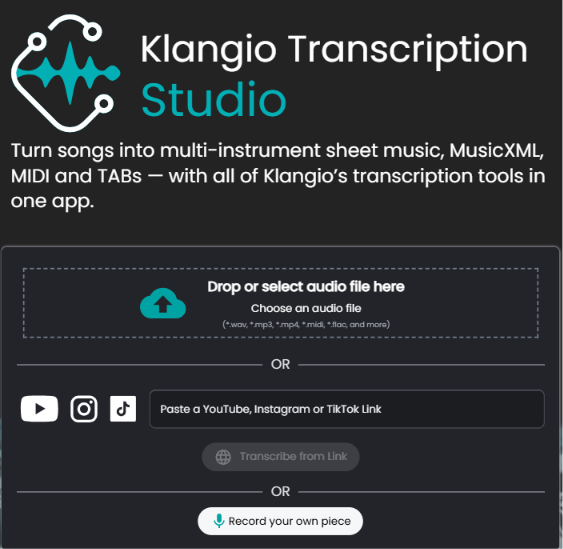
Step 2: Upload Your MP3
Drag and drop your MP3 (or any other audio or video file), paste a YouTube link, or record straight from
your microphone. No login required to get started.
Step 3: Pick Your Instruments and Mode
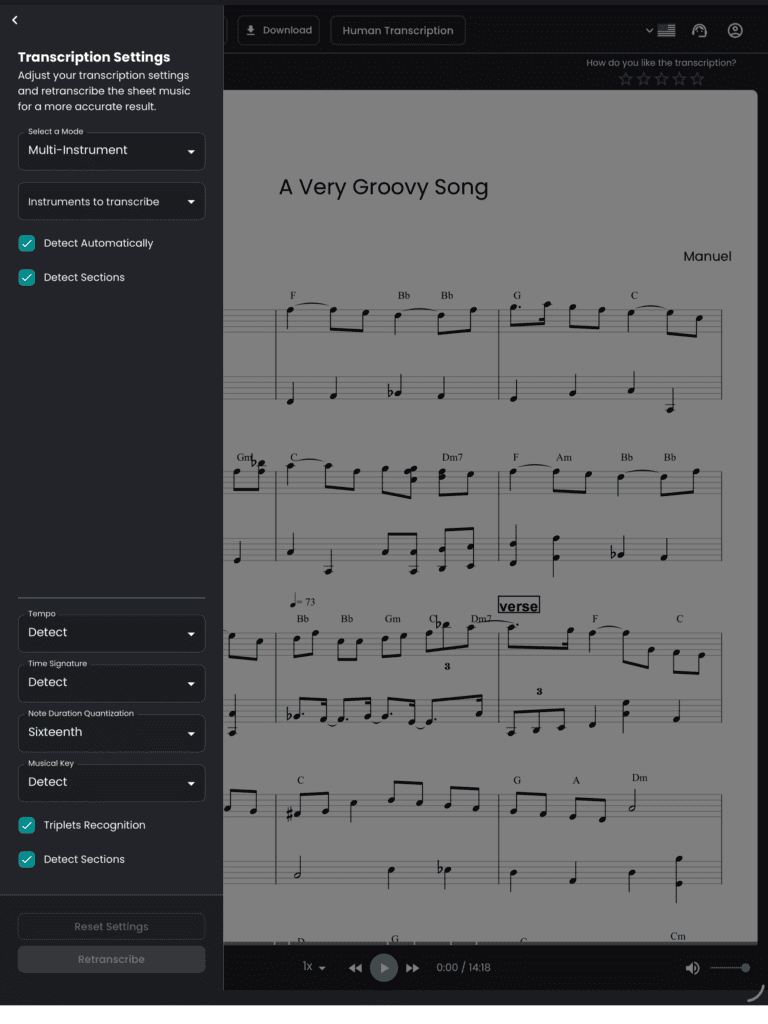
Tell Klangio which instruments are in the recording and choose a mode: Classic for orchestral and acoustic
material, Rock for band recordings with distortion and drums, or Universal if you’re not sure. This helps the
AI focus on exactly what it’s listening for.
Step 4: Get Your Free Demo
Within seconds, you’ll get a free 30-second demo transcription. Play it back and compare it to the original to check the quality before committing to anything.
Step 5: Edit, Upgrade, and Download as MIDI
Happy with the result? Upgrade to the full transcription, fix any notes you want to adjust in the built-in Edit
Mode, and download your file. You can export as MIDI, and also as MusicXML, PDF or GuitarPro, depending on what you need next.
Picking the Right Tool for Your Instrument
If you already know exactly what you’re transcribing, a dedicated tool gets you there even faster than the
multi-instrument Transcription Studio:
- Piano2Notes for piano recordings
- Guitar2Tabs for guitar and bass, including TABs
- Drum2Notes for drum grooves and fills
- Sing2Notes for vocal melodies
- Violin2Notes and Wind2Notes for strings, brass, reed, and pipe instruments
- Klangio Transcription Studio for full songs with several instruments at once, running all of them together in a single pass
From MP3 to MIDI, Straight Into Your DAW
If you produce music, uploading a file to a browser tab and re-importing MIDI afterward is one step too
many. The Klangio Transcription Plugin skips it entirely: install it as a VST3, AU, or standalone app, drag
audio straight from your DAW timeline into the plugin, and drag MIDI back out, for up to eight instruments at
once. No exporting, no re-importing, no leaving your session.
Building mp3 to midi conversion into your own product instead? The Klangio API gives developers
programmatic access to transcription, plus source separation, beat tracking, and chord recognition, so you
can offer the same conversion inside your own app.
Quantized vs. Unquantized: Which MIDI Do You Need?
Quantized MIDI snaps every note to a clean rhythmic grid, ideal if you want readable sheet music or a tidy
practice file. Unquantized MIDI keeps the original timing of the performance, every slight push, pull, and
human imperfection intact, which producers usually want when they’re sampling the actual feel of a
recording.
Klangio Transcription Studio lets you export both. The Transcription Plugin always gives you unquantized
MIDI, since it’s built for producers who want to quantize and shape the notes themselves, right inside their
DAW.
Tips for a Cleaner MP3-to-MIDI Conversion
- Start with the cleanest recording you can find. A studio version will always transcribe more accurately than a noisy live bootleg.
- Match the mode to the music. Picking Rock, Classic, or Universal correctly helps the AI know what to listen for.
- Check the free demo before you commit. Twenty seconds is enough to tell if the AI is reading the right instrument, key, and tempo.
- Use Edit Mode for small fixes. If one note is slightly off, correct it in the browser instead of starting over.
- Export the format your workflow actually needs. MIDI for your DAW, MusicXML for notation software, PDF if you just want something to read from.
FAQ
Yes. Klangio lets you create a 20-second demo transcription for free, as many times as you like, so you can test the quality before upgrading to a full transcription.
Use Transcription Studio if your recording has several instruments, or a dedicated tool like Piano2Notes or Guitar2Tabs if you only need one.
Yes. Klangio exports standard .mid files that open in every major DAW, including Ableton, Logic Pro, FL Studio, Cubase, Reaper, Pro Tools, and GarageBand.
Ready to turn your next song into sheet music,
for every instrument in it?
Try Klangio Transcription Studio, the AI music transcription app built for full songs, for free!
Your first demo transcription takes just seconds, no signup required.
→ Start your Free Transcription
