
If you’re unsure about what the Klangio apps can and can’t do, then you’ve come to the right place. In this article, I will explain what kind of music each of the Klangio apps can transcribe.
Check out our product comparison over here: https://klang.io/products/
Which Transcription Mode should I choose? #
All Klangio Apps (except for Melody Scanner) offer a Single-Instrument Mode, a Multi-Instrument Mode, and an Arrangement Mode.
Our Klangio Transcription Studio offers even more options.
You select the mode depending on the number of instruments in the song you are using as input. The Single-Instrument Mode will transcribe all audible notes, as the audio should only include the instrument that is being transcribed. The Arrangement Mode creates a playable arrangement for one instrument.
Can the Klangio Apps Transcribe Songs with Multiple Instruments? #
Yes! After choosing your input format of music and selecting your instrument, the Transcription Wizard will ask you to select a mode. Choose the “Multi-Instrument Mode” if other instruments are also playing simultaneously in your track.
Which time signatures can Klangio transcribe? #
The Klangio apps can transcribe in 4/4, 3/4, 6/8, and 2/4 time signatures.
Which instruments can the Klangio Apps transcribe? #
Each of the apps is specialized in its own set of instruments but can only transcribe one of these instruments at a time, except for our Klangio Transcription Studio. Continue reading for more information about the specific apps or try out the Transcription Wizard, which will guide you through the process.
Klangio Transcription Studio #
Klangio Transcription Studio can transcribe a wide range of instruments:
- Piano
- Guitar
- Ukulele (only in Single-Instrument mode)
- Bass
- Drums
- Vocals
- String Instruments
- Violin
- Viola
- Cello
- Double Bass
- Wind Instruments
- Saxophone (Alto, Tenor, Soprano & Baritone)
- Clarinet
- Flute
- Recorder
- Oboe
- Bassoon
- French Horn
- Trumpet
- Trombone
- Tuba
- Synthesizer
This app is perfect when you are working with recordings with multiple instruments for which you need sheet music or other digital notations.
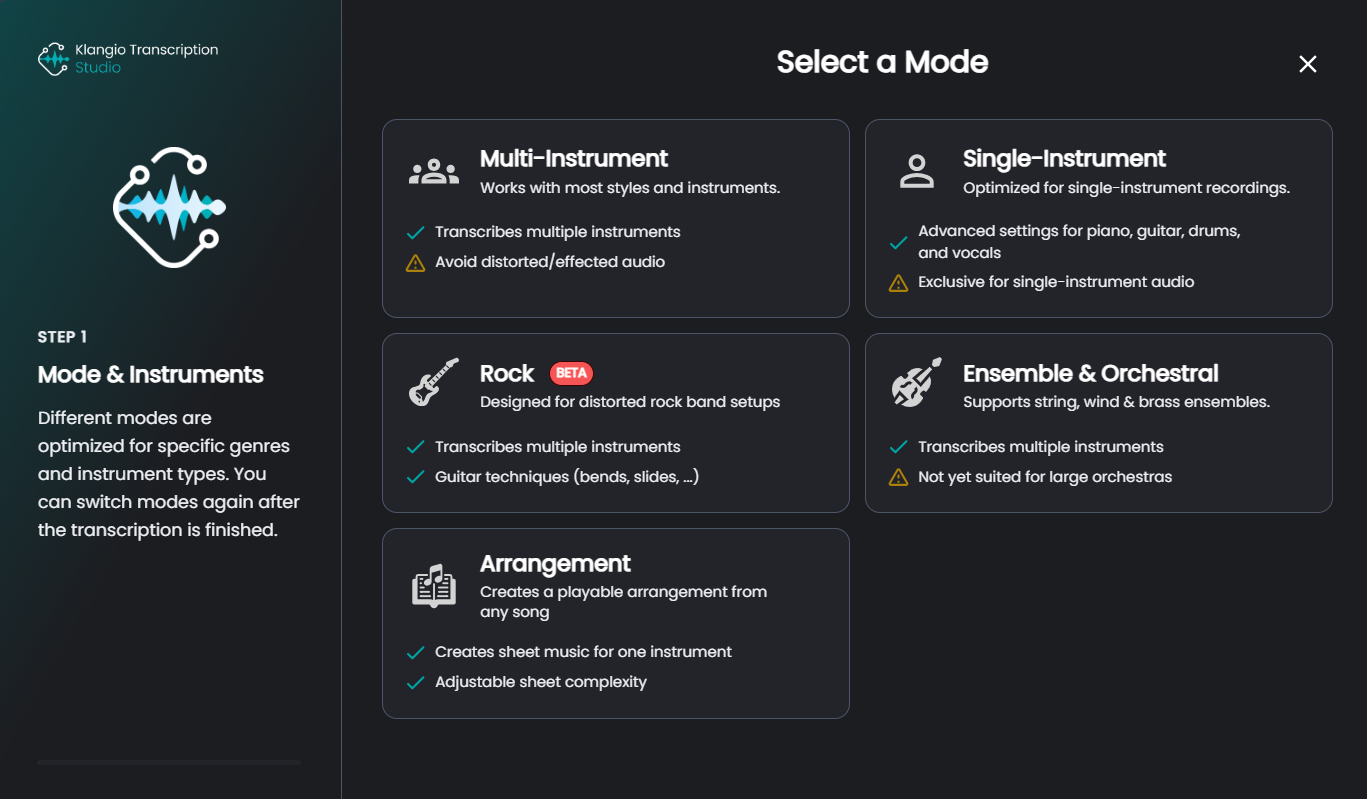
You can decide between 5 different modes:
- Multi-Instrument Mode
- Transcribe multiple instruments into the same sheet.
- Single-Instrument Mode
- For audio containing one instrument
- This mode additionally offers advance settings for guitar, piano, drums and vocals
- Rock (beta) Mode
- Transcribes multiple instruments in a rock band setup
- can detect guitar techniques (bends, slides, etc.)
- Ensemble & Orchestral Mode
- Transcribes multiple instruments
- Ideal for string, wind & brass ensembles
- not yet suited for large orchestras
- Arrangement Mode
- Creates a playable arrangement for one instrument (even if it is not included in the song used)
- You can adjust the complexity of your sheet
- Available for piano, acoustic guitar, saxophone, and as a Lead Sheet (sheet containing the melody and chords for a song)
Piano2Notes #
With Piano2Notes, you can transcribe music that contains a piano or piano-alike instruments:
- Pianos
- Organs
- Pitched Percussive (like a xylophone or glockenspiel)
Guitar2Tabs #
Guitar2Tabs transcribes guitar music. Currently, the following guitar types are available:
- Acoustic Guitars
- Electric Guitars
- Bass Guitars
- Ukulele (only available for Single-Instrument Mode)
Note that currently, distorted electric guitars can only be transcribed with recordings that do not contain other instruments than the distorted guitar. To get the best results, select “Electric Guitar”, then “Solo Instrument”, and finally “Finger picking” for any solo distorted guitar recordings that are played with a plectrum or with fingers. Or you can check out the Rock Mode for our Klangio Transcription Studio.
Drum2Notes #
Drum2Notes can transcribe the drums from any song. It can differentiate between kick/bass drum, snare, various toms, open and closed hi-hats, crash, ride, and cowbell.
Sing2Notes #
Sing2Notes lets you transcribe vocals and lyrics of any song.
Violin2Notes #
Violin2Notes allows you to transcribe violin, viola, cello, and double bass into sheet music.
Wind2Notes #
Wind2Notes can turn flute, clarinet, trumpet, trombone, saxophone, and other wind instruments into sheet music.
Melody Scanner #
In contrast to the other Klangio Apps, Melody Scanner can transcribe virtually any song! However, it does not aim to deliver a precise transcription for single instruments, like with the other apps, but instead a transformative notation for the piano. Check out the tutorials on the Arrangement Mode and the Lead Sheet Mode to learn more about it.
Melody Scanner can be used for piano, guitar, bass, vocals, violin, flute, and saxophone transcriptions.
Scan2Notes #
Scan2Notes can scan existing sheet music (for example, as an image or PDF file) and convert it into a digital format that you can play back, edit, and download again.
Feel free to check out the other articles in our Help Center if you have questions about what kind of music the Klangio Apps can transcribe.
Frequently Asked Questions #
At the moment, all voices are written into a single staff. We’re still working on a feature that can properly transcribe trios and choirs with multiple separate parts. Because of this limitation, some parts may appear to be “missing” or merged into one line.
With our Klangio apps, you can transcribe audio into sheet music and edit it. Klangio does not offer an option to generate a new song from scratch
You can do so by using either Sing2Notes or our Klangio Transcription Studio.
Open Sing2Notes or KTS and upload/record your song or paste a YouTube link.
Select the Multi-Instrument mode and then Vocals. The AI transcribes only the singing into sheet music.
Pitch bends (and other note effects such as palm mutes, bends, slides, harmonics, etc.) are currently only transcribed in Rock Mode. When you export the transcription as a Guitar Pro and PDF file (not supported for other export options yet), these articulations are included and written into the file.


